
Your customer gets a price from your own rates before you could pick up the phone.
Your customer uploads a file to your website and Forgmatic calculates the price using your rates. The order continues through production to invoicing without re-entering data. Start with just the calculator; keep accounting in your existing software.
- No monthly fee
- You set it up yourself in an afternoon
- EU invoicing rules, EU-resident data
FDM 3D printing
Sample part
We do not yet have complete data to price this sample combination. Try another material or operation.
This example uses a sample part and rates from the platform catalogue. You set your own prices in your shop.
How your day changes
What you do by hand today — and what the system does tomorrow.
How it works
Four steps. Set it up once, then it runs itself.
- 01
Load in your price list
Materials, dimensions, finishes, machine and labour rates, rush surcharges, quantity discounts. Set it once — and when your input costs go up, you change the rate in one place.
- 02
Add the calculator to your website
We embed the calculator on your site, or you get your own page at something like quote.your-shop.com. Your logo, your colours, your domain.
- 03
Your customer uploads a file
Forgmatic reads it, prices it from your price list and shows the earliest date you can actually hit. You don't even know yet.
- 04
The order lands in your inbox
With the file, the parameters, the price and the customer's details — and it is waiting in your admin too. Process the order through your production workflow.
What it can price
If you can make it, you can price it here.
You build an operation in the admin out of what the customer fills in and your own rates. That is why the thing only you do fits in here too. This is what is running today:
Laserové řezání plechu
Přesné laserové řezání plechu z 2D výkresu (DXF) — ocel, nerez, hliník. Nahrajete DXF, zvolíte materiál, tloušťku a počet kusů; cenu spočítáme z délky řezu, počtu propalů a plochy polotovaru.
3D tisk FDM
Tavení plastové struny po vrstvách. Prototypy, kryty, držáky, přípravky a funkční díly z PLA, PETG, ASA, TPU nebo nylonu, od jednoho kusu.
Povrchové úpravy
9 operationsWhat happens to the part once it is made — painting, powder coating, galvanising, pickling, grinding. Priced by area or weight, most often as a markup on the part.
11 operations are ready to go right now. Not the one you need? You can easily build your own.
What is behind it
What Forgmatic takes off your hands.
You set the price, not us
You enter what an hour of machine time and an hour of work cost, what you charge for a rush job and from how many pieces you give a discount. Every quote is priced from that — the way you would price it. And when something is missing, Forgmatic says so out loud instead of inventing a price.
It won't offer what you couldn't make
You tell it which materials, thicknesses and sizes your machines handle. The customer is then offered only what you can actually make, and a part that fits nowhere is refused before it becomes an order. No more “sorry, we can't do that” phone calls.
Lead times from what you can get through
Enter your available production capacity. Customers see an estimated delivery date based on the production schedule and shipping. If information needed for the calculation is missing, the date is shown as awaiting confirmation.
The customer and the money stay yours
Customers see your name, address and colours. Payments go to your connected account; commission is charged on paid orders. Your own domain and removing the Forgmatic mark from invoices and emails depend on your plan.
The order carries on through the shop
The order becomes a production job with a date, material is booked out of stock, and when stock runs low it asks to be reordered in time. Customers, suppliers and your own people are in one place. Three spreadsheets and one inbox fewer.
The invoice comes out the way your accountant wants it
Proforma, invoice and credit note, numbered in sequence and carrying what Czech law requires. Company details filled in from the company ID, VAT handled for a foreign customer. Your bookkeeping stays in your own software. Exactly what it does is in the questions below.
- Let us know
Didn't find yours?
Tell us what would help. We'll answer straight out — whether it's configurable today, or whether we still have to build it.
From the app
This is what it looks like inside.
No fictional dashboards — these are the screens where you set up your price list and where an order then makes its way through the shop.
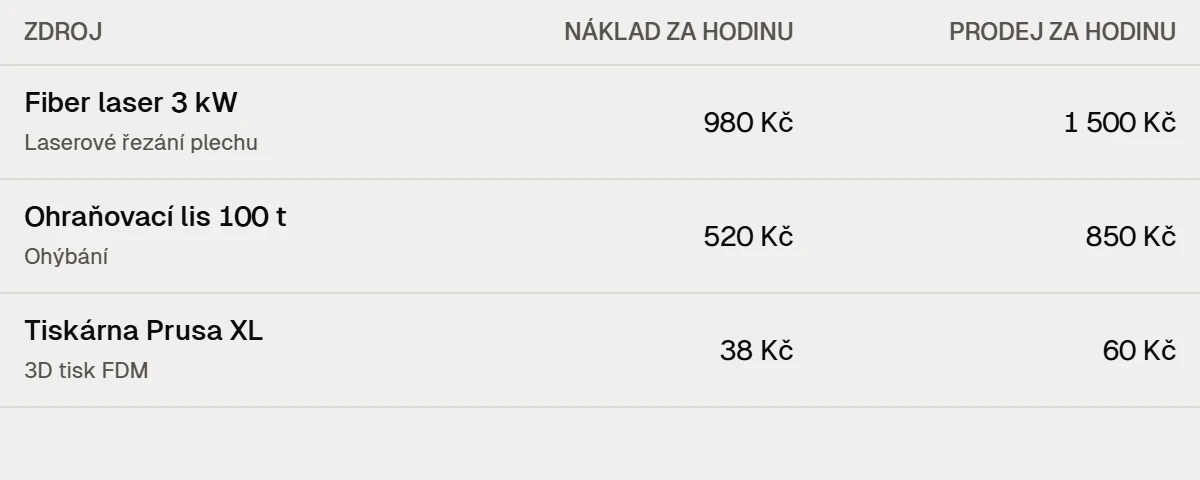
Your price list. What an hour of each machine costs you and what you sell it for — the price is calculated from that.
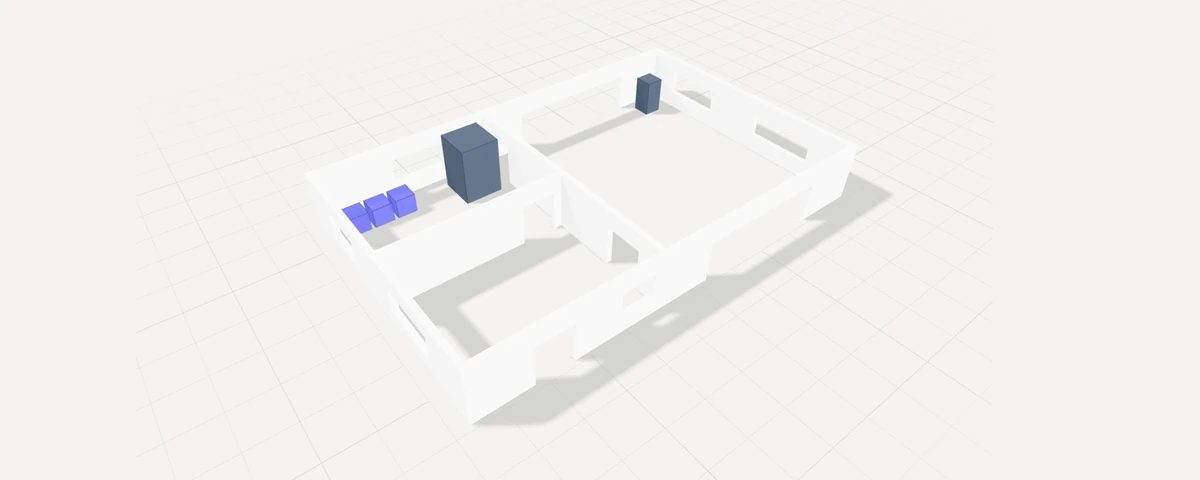
Places in the shop. A floor plan of the shop and store — where each machine and rack stands.
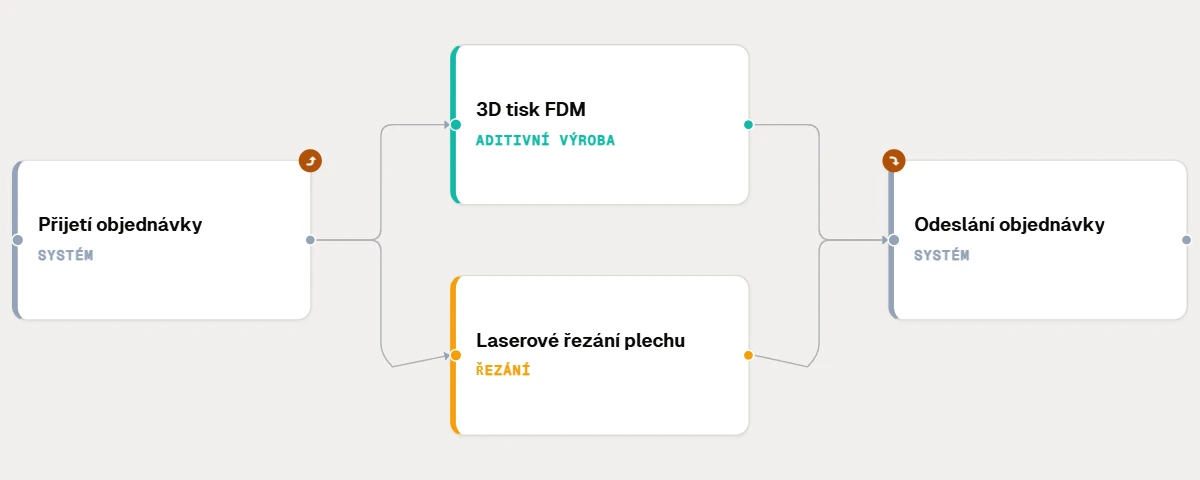
Production chain. Operations and how they follow each other, dragged onto a canvas.
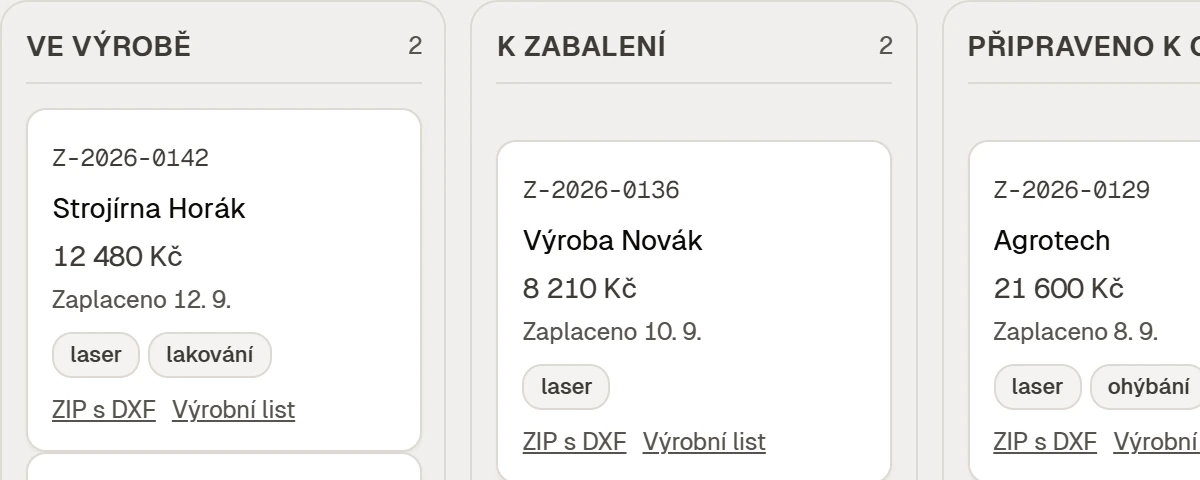
Orders on a board. Every order in the column for where it is right now.
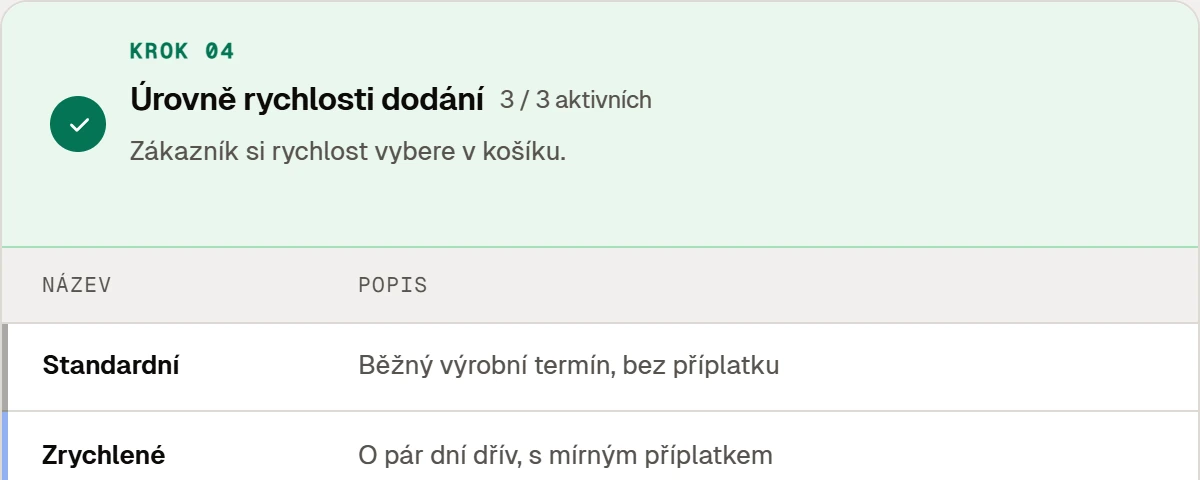
Delivery speed. The customer picks it in the cart — standard, faster or express.
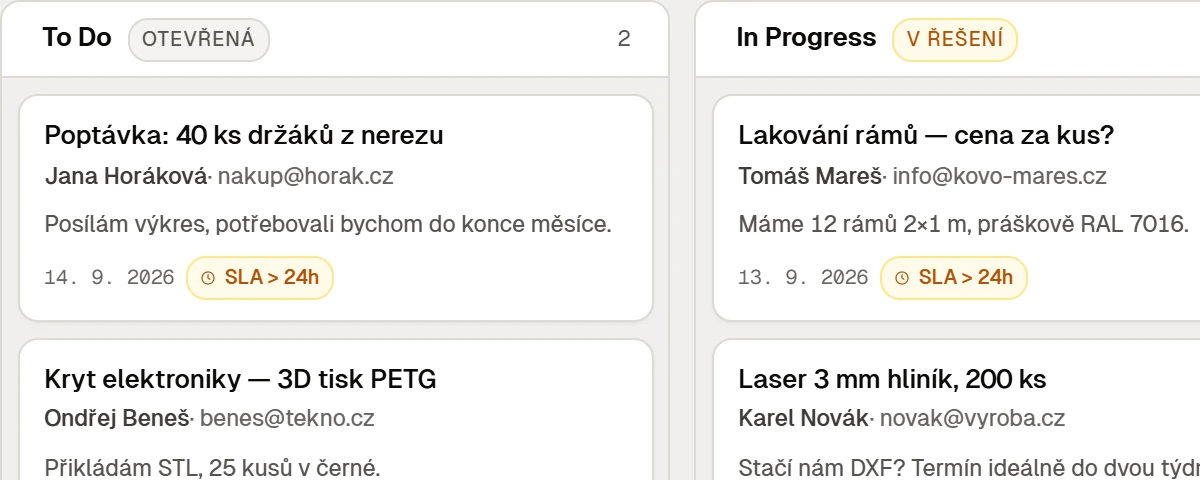
Enquiries in one place. Contact-form messages on one board, with response times watched.
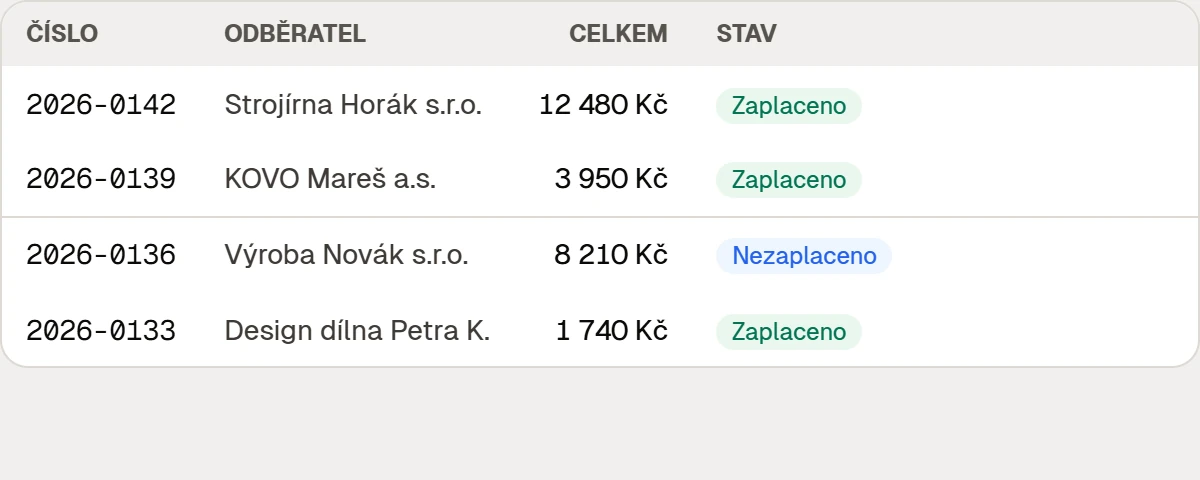
An invoice from the same numbers. Company filled in from its ID, VAT checked, PDF to download and in the customer's e-mail.
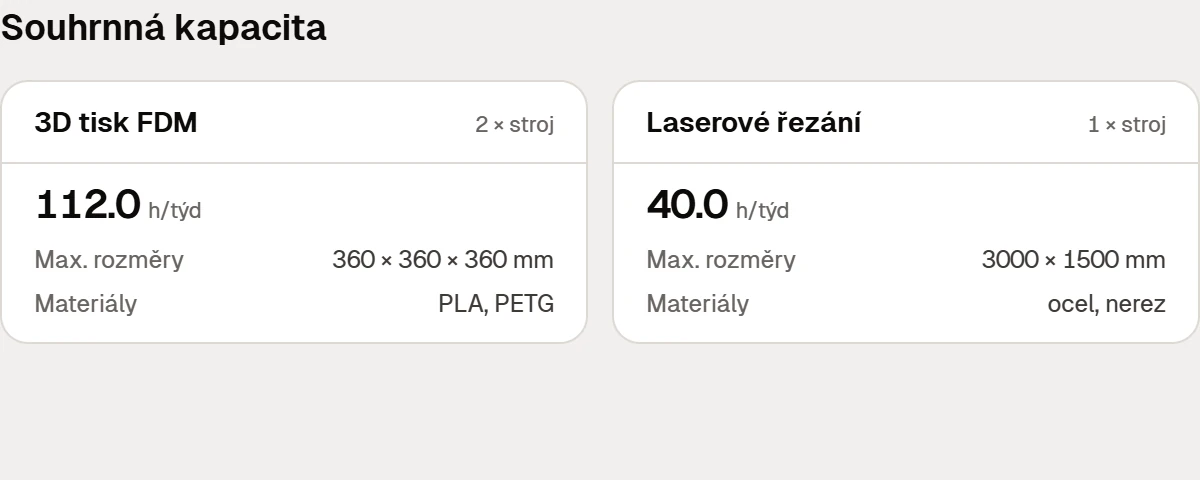
Your machines. Dimensions, materials and weekly hours — capacity is calculated from them.
- And more — stock, batches, labels, machine catalogue.You can start with the calculator alone; the rest is ready when you want it.We'll show you →
One job, one record
From drawing to invoice, with no retyping between programs.
The price, the order, production, stock, the label and the invoice all come out of one record. What the customer entered once is never retyped somewhere else — and that is the difference from a calculator that only does the price.
Drawing
The customer uploads it on your site.
Price
Computed from your price list, right away.
Order
From the accepted price, contact included.
Production
A job dated by your own capacity.
Stock
Material booked out, purchasing watched.
Label
The part says whose it is and what it is.
Invoice
Same numbers. Nothing keyed in twice.
You can start with the price alone. The rest sits ready for when you want it.
Do the sum
How much time goes into hand-written quotes?
Just your two numbers multiplied together. And some of those enquiries arrive when nobody is at the desk.
Frequently asked
What you want to know before you try it.
It starts as a quote and doesn't stop there. The same order carries on into stock with batches and reservations, purchase orders to suppliers, a production board that dates work against your real capacity, labels, part traceability and a compliant invoice. You can take just the quoting part. The rest sits there for when you want it.
The platform knows no manufacturing operation at all — not even laser cutting. An operation is a data record: what the customer has to enter, what formula turns that into a price, and what it draws from stock. On a paid plan you assemble one yourself in the admin; on Free you pick from the ones already there. Either way, it isn't decided on our roadmap.
Free has no monthly fee. Paid orders incur commission, and paid add-ons are charged separately. See pricing for rates, any commission cap and each plan’s limits.
Yes. Your shop is created after Stripe verifies your card. Verification does not charge a subscription. Free has no monthly fee; paid orders incur the commission listed in our pricing.
Signing up takes two minutes, then a wizard walks you through it. The formula that computes your price is assembled with the mouse from tiles — rates, geometry, brackets, min, max — not by writing code. Two things take real work: your price list, and the skill matrix, meaning what your machines can actually make. Without the matrix an order won't clear checkout — deliberately, because the system shouldn't promise something nobody on your floor can produce.
No. You can mark selected configurator options as “quote only”. The customer submits their requirements and you prepare a quote manually. An item without a calculated price cannot be paid for directly.
The estimate uses the production schedule, configured capacity and shipping time. If an operation has no time estimate, the customer sees “Date to be confirmed”. Changes to the schedule can change the delivery estimate.
They write to you. Form messages and e-mails land in one inbox in the admin and thread themselves; anything arriving by mail brings its attachments along, so a photo or a PDF doesn't end up in a different folder. You then build the quote by hand — lines, operations, price, proforma. The customer gets a link and accepts in one click. From that point it's an ordinary order, with the same history as the ones priced automatically.
Yours. Stripe Connect payments go to your account. Your shop uses your logo and colours. A custom domain and removal of Forgmatic branding from invoices and emails depend on your plan; see pricing for details. Data is stored in the EU and can be exported. Downgrading to Free does not delete your data. Free features and limits apply; if you exceed a count limit, you cannot add more items until you are within it.
Custom domains from Pro. Invoices and emails without Forgmatic branding from Enterprise.
Sequential invoice numbering, proforma invoices, credit notes and the VAT recapitulation Czech law requires. Reverse charge, OSS/IOSS, VAT-number checks against VIES and the data for the EC Sales List. Company details come from the Czech business register by company ID. Data is stored in the EU. Bookkeeping, payroll and assets stay in your accounting software — Forgmatic does not replace it.
Rates, materials, machine capacity and surcharges you change yourself, and the change applies to the next inquiry immediately. No release, no ticket on our side.
Get in touch
Send us a message — we usually reply within one business day.
Give your customer a price now.
Before somebody else does.
Upload your own files and set your price list. Free has no monthly fee; paid orders incur the commission listed in your plan. We verify your card at sign-up without taking a payment. Enable paid add-ons when you need them.